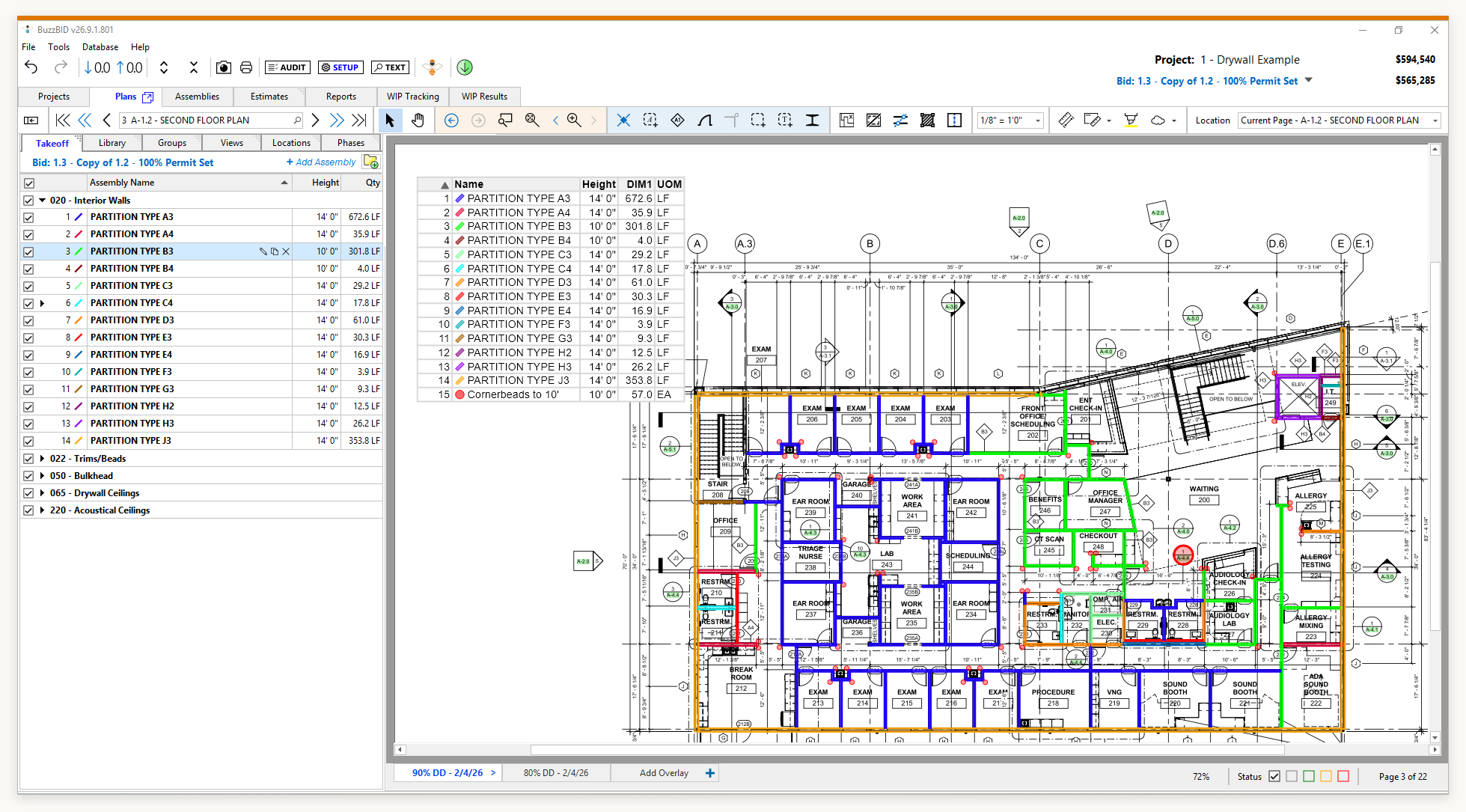




This comparison uses BuzzBID Standard because it is the takeoff-only edition. BuzzBID ClickONCE™ is also included in BuzzBID Advanced and BuzzBID FireShield.
Two walls can look alike on a plan and belong to different parts of your bid. One is new work. The other is existing to remain. A door symbol might repeat throughout the building, while a particular opening belongs to an alternate you need to carry separately.
Those decisions stay with the estimator. The value of takeoff automation depends on how well it helps you make and carry out those decisions while reducing repetitive work.
If you are comparing BuzzBID, Togal.AI and ConstructConnect Takeoff Boost, start with the workflow. How do you tell the software what you need? Where do you check the results? What happens to the drawings when you run the automation?
BuzzBID ClickONCE™ in BuzzBID Standard is built around computer vision inside the BuzzBID Windows application. You direct the tool as you perform the takeoff, see what it identifies and verify the result on the drawing. Its local processing approach is an important reason to consider BuzzBID when you want automation within your own computing environment.
Togal.AI and Takeoff Boost also give estimators ways to direct, review and edit automated takeoff. A fair comparison needs to acknowledge those capabilities. The useful differences are in the working environment, the automation you use and the route your plans take to produce a result.
What estimator control means during takeoff
Control starts before a quantity reaches the estimate. You decide which drawing and revision govern the work, what belongs in your scope and which conditions need separate treatment. Then you choose how to measure it.
Consider a floor plan with several partition types. Finding similar linework is useful, but you still need to connect each run to the wall schedule, account for openings and understand where the specification changes. Depending on the project, height, finish or assembly differences can matter more to the estimate than the length alone. Our wall and ceiling estimating workflow guide explains how those checks connect takeoff quantities to the work you price.
Useful automation lets you stay close to those decisions. You should be able to inspect the marks on the drawing, correct a questionable result and continue working without losing track of what you were measuring.
That is the idea behind estimator-controlled automation. The estimator directs the work and uses recognition tools where they help. The practical test is how comfortably the software supports that process on the plans you actually bid.
How BuzzBID ClickONCE™ fits your estimating process
We built BuzzBID ClickONCE™ around proprietary computer vision and programmed pattern recognition inside BuzzBID. You choose what to find and use the tool while you are doing the takeoff, with results visible for you to check as you work.
For wall partitions, BuzzBID ClickONCE™ lets you take off an individual partition with a single click or a group of connected partitions with a double-click. You can also take off partitions by wall tag. For ceiling areas, you can work one room at a time or across a plan page. Our wall and ceiling takeoff overview shows these tools in context.
Those choices let you work at the level that fits the task. If you are concentrating on one room or one condition, you can stay with it. Standard also includes an audit filter for individual takeoff items, multiple scales per page and six takeoff windows. These features support the checking and navigation that happen around the measurement.
The architecture is equally relevant. BuzzBID Standard runs in a Windows desktop or server environment. BuzzBID ClickONCE™ recognition runs within the application, without sending plans to an external AI service for processing or learning from those plans.
That processing description is specific to BuzzBID ClickONCE™. BuzzBID also uses hosted authentication, licensing and optional sharing services. File storage and remote hosting depend on your setup. The BuzzBID hosted services notice explains the difference between the customer environment and BuzzBID’s connected services.
This comparison focuses on Standard’s takeoff tools. BuzzBID Advanced adds assembly-based estimating. If you want to build material and labor costs in the same application, compare the BuzzBID editions so the package you evaluate matches the work you intend to do.
How Togal AI and Takeoff Boost approach the work
Togal.AI
Togal.AI offers a cloud-based takeoff environment. Its automated takeoff guide describes uploading drawings, checking scale, selecting all supported features or a custom selection, running detection and reviewing the results on the drawing and in the quantities panel.
Togal also has targeted tools. With AI Image Search, you select an example on the drawing, search for matches and review the highlighted results before turning them into a count. Its documented editing tools let you correct and reclassify takeoff. Togal users therefore have control both before and after detection.
The question for your team is whether you want to perform that work in Togal’s cloud environment. During a demonstration, follow one measurement from detection through correction and into the output you need for estimating. Check the steps you will repeat on every job, along with the collaboration features that may matter to your team.
ConstructConnect Takeoff Boost
Takeoff Boost is ConstructConnect’s suite of AI tools for On-Screen Takeoff. The Auto Takeoff guide describes choosing measurement types, uploading selected plans to the Boost service and reviewing the returned takeoff.
The guide tells users to inspect the results, reassign takeoff to the appropriate Conditions, add missing takeoff and make adjustments. Boost combines user choices before processing with estimator review afterward. Its separate Auto Count tool also uses an estimator-selected example to find matching objects.
That distinction matters if you already use On-Screen Takeoff. Boost’s integration means you should not assume that adopting its automation requires abandoning the application you know. The automated processing step uses a service outside the local application, while the documented review takes place in the On-Screen Takeoff workflow.
Across all three products, ask to see the specific tool you expect to use. A demonstration of automatic area detection will not answer every question about counting symbols. If you are considering a wider shortlist, our AI takeoff software comparison explains the different product categories.
A practical workflow comparison
| What to compare | BuzzBID Standard with BuzzBID ClickONCE™ | Togal.AI | Takeoff Boost |
|---|---|---|---|
| Working environment | Native Windows BuzzBID application | Cloud-based takeoff platform | Integrated with On-Screen Takeoff |
| Estimator direction | Choose what to find as you perform the takeoff | Choose detection types or select a pattern to search | Choose Auto Takeoff types or select an Auto Count example |
| Review and correction | Verify results within your BuzzBID takeoff workflow | Review and edit takeoff using documented editing tools | Review returned Conditions and quantities; reassign, add and adjust takeoff |
| Processing distinction | BuzzBID ClickONCE™ recognition runs in the customer environment, according to BuzzBID | Plans are used within a cloud-based service | Selected plans upload to the Boost service for processing |
On a small screen, swipe the table to compare all three products.
These are workflow distinctions, not a ranking of accuracy. Results and the effort needed to verify them depend on the drawings, the task and the way the tools are used.
What happens to your plans deserves a direct answer
A plan upload is a business decision. Before using any takeoff service, your team needs to know whether the project’s requirements allow that upload and what the service is permitted to do with the content.
Start with the actual processing step. Does the selected feature run in your own environment, or does it send the drawing to a hosted service? Then look at retention, access and the applicable terms. A general statement that a vendor takes security seriously does not answer all of those questions.
Ownership and permitted use deserve separate attention. Togal’s public End User Service Agreement, last updated February 20, 2025, says customers retain ownership of their content. Section 8 also permits processing Customer Content to develop Togal’s machine learning models, subject to a restriction on the models disclosing customer confidential information. Ownership alone does not resolve the model-development question.
That provision does not establish what happened to any individual customer’s plans. Ask which agreement governs your account and get any required limits on plan use confirmed in writing.
ConstructConnect’s Auto Takeoff documentation confirms that plans upload to the Boost service. Review the agreement for your exact product, including retention and permitted improvement uses. ConstructConnect has different terms for different offerings, so terms for its web-hosted takeoff product should not automatically be applied to desktop On-Screen Takeoff.
With BuzzBID ClickONCE™, the recognition tool runs within the application and does not learn from your plans. BuzzBID’s Terms of Service separately describe customer-managed data and restrict using identifiable Customer Data to train generalized AI models unless the customer gives informed permission or deliberately selects a feature that discloses that use. This is a more specific basis for evaluation than a broad promise that a vendor never uses customer data.
Your own security practices still count. Access to the Windows environment, shared folders, backups and any hosting arrangement remains part of protecting the project. Local processing can answer a specific data-flow question without eliminating the need to manage the rest of the system.
Compare the full job on a representative plan set
A useful demo should show how you get from the drawings to quantities you are ready to price. Bring a representative set that you are authorized to use, along with the scope you would normally take off.
If your work includes renovation, include a sheet with existing and new construction. If you regularly separate alternates, carry an alternate through the demonstration. Use the kinds of details that affect your bids.
- Choose a defined scope. Tell each demonstrator which conditions, areas or items you need and which ones must be excluded.
- Watch how you direct the tool. Try a broad automated pass if it suits the task, then a targeted search or measurement. See what you can change before processing.
- Inspect the actual marks. Check scale, boundaries, counts and assignments against the drawing and the scope you selected.
- Make a correction. Remove an unwanted result, add a missed item and change an assignment. Notice whether you can understand the quantity after the edit.
- Finish the estimating handoff. Follow the verified takeoff into the estimating process or export your team uses, and account for any cleanup along the way.
- Confirm the plan-data route. Ask where that specific feature processes the drawing and which terms apply to storage and model development.
If you time the exercise, include the review and correction work. A fast initial result is useful, but the number you need for a buying decision is the time it takes your team to reach a verified, usable takeoff. A single demonstration is also a starting point, not proof of performance on every project.
How the published prices compare
As of October 12, 2026, the published prices below provide a starting point for comparing takeoff software. The billing basis matters, especially when a monthly-looking rate requires annual payment.
| Product | Published price | Billing basis | What to confirm |
|---|---|---|---|
| BuzzBID Standard | $100/month or $1,050/year | Monthly or annual subscription | License quantity and dedicated or shared assignment |
| Togal.AI Growth | $299 per user/month, billed yearly | $3,588 per user/year, calculated from the published monthly rate | Annual billing and required users; Business pricing is custom for teams of 4 or more |
| On-Screen Takeoff with Takeoff Boost | Request a current vendor quote | Package-specific pricing and terms | On-Screen Takeoff tier, included Takeoff Boost tools and any usage limits |
On a small screen, swipe the table to compare all three products.
The BuzzBID pricing page lists Standard’s monthly and annual options, with updates, support and unlimited training included. BuzzBID offers dedicated and shared license assignment, so confirm the licenses and concurrent access your team needs rather than treating the headline price as unlimited team access.
Togal’s Growth price is stated per user and billed yearly. Its $299 monthly rate should not be read as a verified month-to-month payment option. For On-Screen Takeoff with Takeoff Boost, request a written package quote instead of combining unrelated prices or assuming every Boost tool is included.
These are different packages. Compare the required tools, number of estimators and total commitment, then check renewal, cancellation, taxes and any implementation charges in the current quote or agreement. Our construction takeoff software cost guide covers the other items to include in that budget.
When BuzzBID is worth a closer look
BuzzBID is a strong option to evaluate when you want computer vision inside a native Windows takeoff workflow, want to choose how automation assists each stage of the work and prefer to keep BuzzBID ClickONCE™ recognition within your own computing environment.
Togal’s cloud environment and Boost’s On-Screen Takeoff integration may fit different teams. Both deserve to be evaluated for the tools they actually provide. You do not need to dismiss those capabilities to recognize the appeal of BuzzBID’s approach.
The best demonstration of BuzzBID ClickONCE™ is the work itself. Explore BuzzBID Standard and ask our team to show how you select the task, inspect the result and continue the takeoff on a representative plan. You should leave the demonstration knowing whether the tool fits the way you think through a bid.
Frequently asked questions
Does automated takeoff replace estimator judgment?
You still need to interpret scope, revisions, specifications and conditions. Automation can help find and measure drawing content, but the resulting quantities need to be checked before they are used to price the work.
Can you control and edit takeoff in Togal AI and Takeoff Boost?
Yes. Togal documents user-selected pattern search and editing tools. Takeoff Boost’s Auto Takeoff guide describes selecting measurement types, reviewing results and correcting the returned takeoff. The control options and processing workflows differ by feature.
Does BuzzBID ClickONCE™ send plans to an external AI service?
BuzzBID states that the BuzzBID ClickONCE™ recognition covered here runs within its application and does not send plans to an external AI service for processing or model training. That statement is specific to BuzzBID ClickONCE; separate sharing and hosted services have their own data flows.
Does ownership of uploaded plans mean they cannot be used for AI training?
Ownership alone does not answer that question. Review the service’s content license and model-development provisions. Togal’s public agreement, for example, addresses both customer ownership and permission to process Customer Content to develop machine learning models.
Which takeoff software is the most accurate?
This article does not establish a universal accuracy winner. Compare the tools on representative drawings, inspect the results and measure the effort required to produce takeoff that meets your estimating requirements.
Important Information
This article is published by BuzzBID, a provider of takeoff and estimating software. Product comparisons and recommendations reflect our editorial assessment using the criteria discussed here. They are intended to support an evaluation and do not replace a vendor’s current quote, agreement or product documentation. This comparison is based on published vendor materials reviewed on October 12, 2026, and BuzzBID’s description of its own BuzzBID ClickONCE™ functionality. It is not a hands-on comparative benchmark.
Prices, licensing, packaging, features, data-use terms and availability can change. Confirm the details for the specific configuration directly with the relevant vendor. Togal.AI, On-Screen Takeoff, Takeoff Boost, ConstructConnect and other product or company names belong to their respective owners. References identify the products being discussed and do not imply endorsement or affiliation.