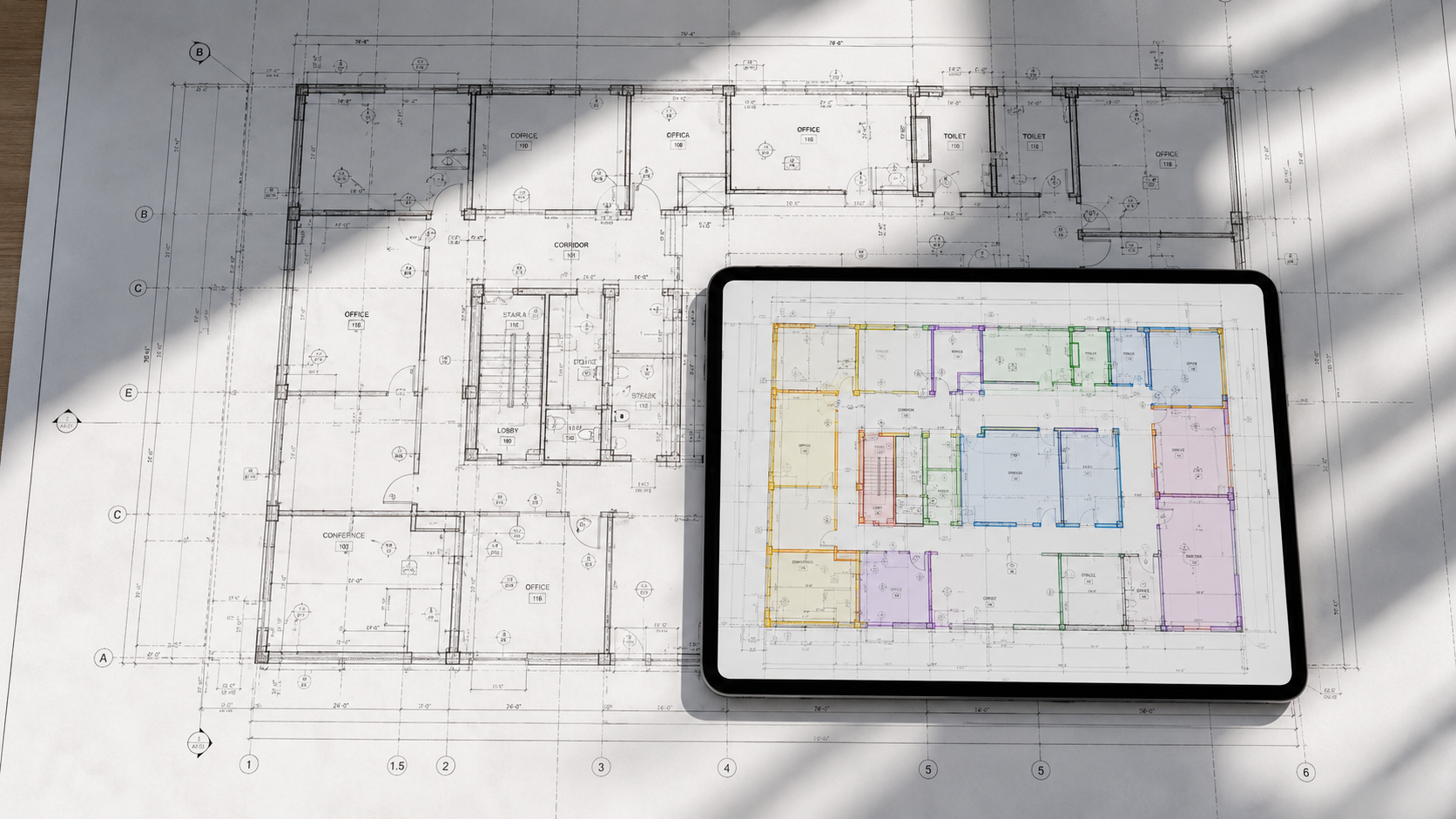




Quick answer: Seven AI takeoff products worth evaluating in 2026 are BuzzBID Advanced, Togal.AI, Beam AI, STACK AI Takeoff, Autodesk Forma Takeoff, Kreo, and ConstructConnect Takeoff Boost with On-Screen Takeoff. They do not all use AI in the same way. Some create editable takeoff directly from drawings, some combine AI with human quality review, and others add targeted automation to an established takeoff platform.
Disclosure: This comparison is published by BuzzBID, which sells one of the products reviewed and ranks BuzzBID first for the commercial specialty-trade audience this article is written for. The ranking is an editorial assessment, not an independent laboratory test. Product information and public pricing were reviewed on October 3, 2026. Buyers should confirm current features, pricing, implementation requirements, and contract terms directly with each vendor.
AI Takeoff Software Comparison
| Product | Practical category | Documented AI-assisted takeoff | Public pricing reviewed October 3, 2026 |
|---|---|---|---|
| BuzzBID Advanced | Integrated specialty-trade takeoff and estimating | ClickONCE computer-vision takeoff | $250/month or $1,750/year for Advanced |
| Togal.AI | AI-native cloud takeoff | Detection, measurement, counting, search, and classification tools | $299/user/month, billed annually, for Growth; Business is custom |
| Beam AI | DIY, done-for-you, or hybrid | Automated takeoff with optional human quality review | DIY from $8,000/year/trade; done-for-you from $25,000/year, based on trade and volume |
| STACK | AI-augmented cloud platform | AI Takeoff for doors, windows, rooms, and walls; separate plan-text chat | Premium $299/user/month or Pro $349/user/month, billed annually; AI Takeoff included in both |
| Autodesk Forma Takeoff | AI-augmented 2D and 3D platform | Automated symbol detection and 3D model quantities | Advertised from $108/month; confirm term, currency, and subscription |
| Kreo | AI-native takeoff | Auto Measure, One-Click Area, Auto Count, and related AI tools | $175/user/month, billed annually, for Pro |
| Takeoff Boost with On-Screen Takeoff | AI-augmented desktop platform | Auto Takeoff, Auto Count, Auto Link, Auto Name, and Auto Scale; availability varies | Confirm current subscription and feature pricing with ConstructConnect |
Pricing and feature availability can change. Taxes, onboarding, implementation, add-ons, usage limits, enterprise requirements, and renewal terms may affect total cost.
From Plan Quantities to an Estimate: A BuzzBID Example
For a commercial wall-and-ceiling contractor, automated takeoff software needs to fit the estimating work that follows. These views from a BuzzBID demonstration project illustrate two parts of that workflow:
- Measure and organize the work. Use ClickONCE computer-vision takeoff and review the color-coded partitions against the plans. The assembly list keeps wall types, heights, and linear-foot quantities visible.
- Review the estimate. Work with grouped assemblies and inspect quantity, labor, material, equipment, subcontract, and other cost columns. Review unit costs, indirect costs, and selling prices before preparing a proposal.
- Check the assumptions. Verify scale, wall tags, heights, openings, plan revisions, assembly contents, and labor assumptions. Automation supports this review; it does not decide the final scope or bid.
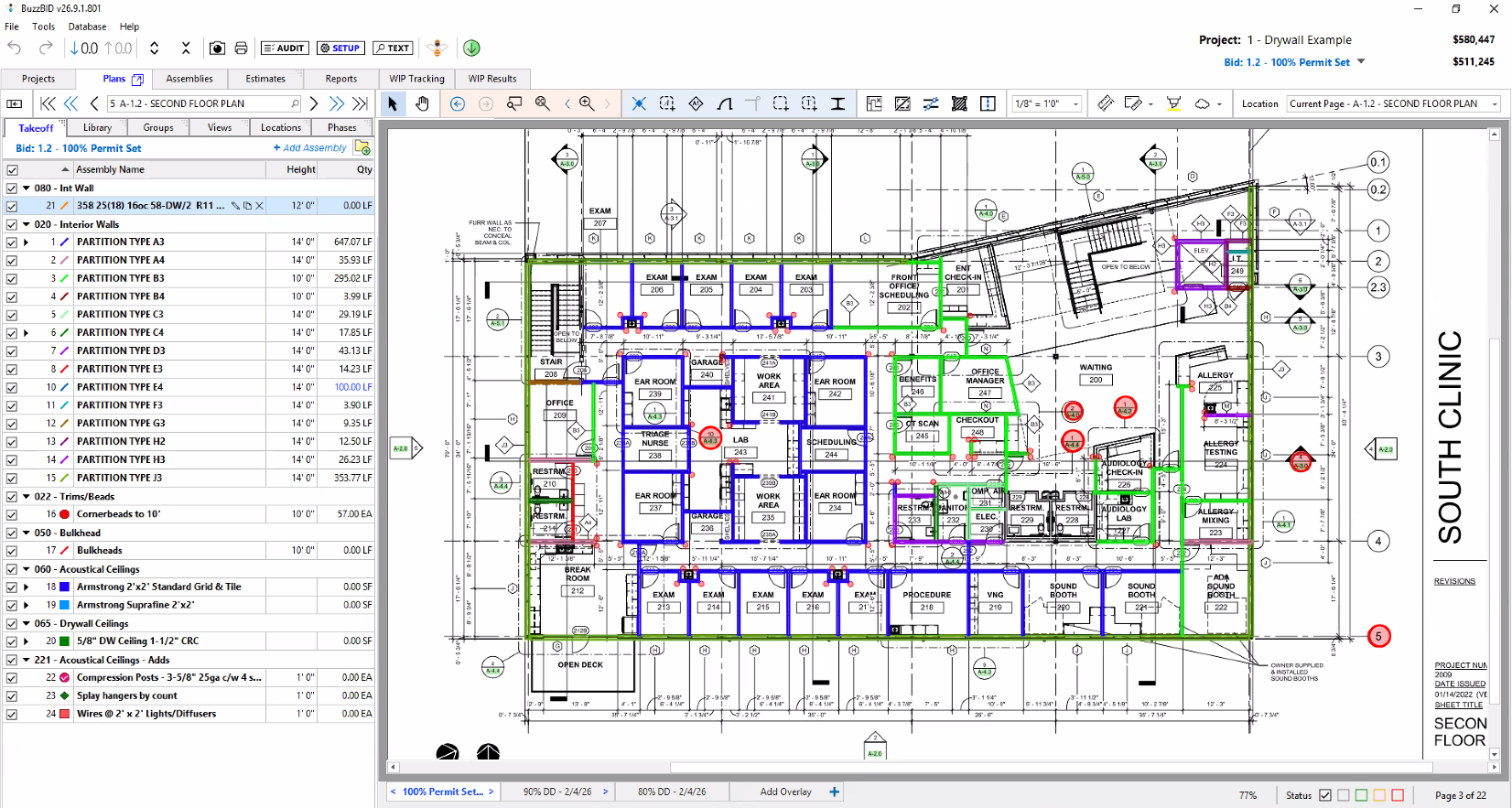
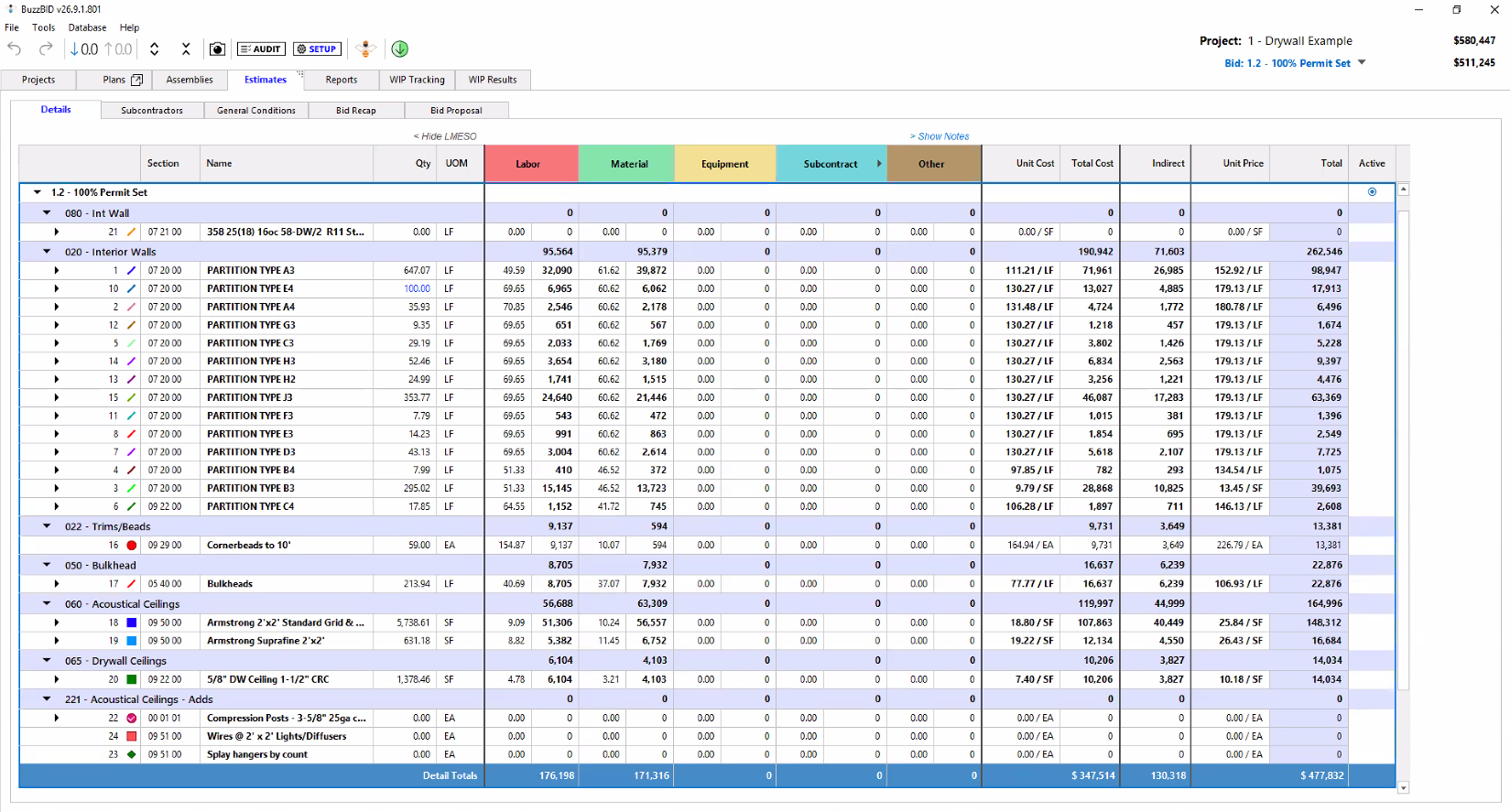
Illustrative screenshots from a demonstration project; they show different working states and are not a timed performance or accuracy benchmark.
Explore drywall and wall-and-ceiling takeoff software, see the full BuzzBID feature set, or read how computer-vision takeoff works.
Choose a tool around the quantities you need, your trade, and who will review the results. Some teams want to perform digital takeoffs in-house. Others want a service to deliver a checked takeoff. The four categories below explain those differences:
- Integrated computer-vision takeoff and estimating: AI-assisted quantities feed directly into a broader specialty-trade estimating workflow.
- AI-native takeoff software: The product emphasizes automated detection, measurement, search, and classification inside a self-service takeoff application.
- Hybrid or managed AI takeoff: Buyers can use a self-service workflow, a vendor-delivered workflow with human quality review, or both.
- AI-augmented established platforms: A broader takeoff platform adds specific AI tools such as area, wall, room, door, window, or symbol detection.
What Is AI Takeoff Software?
AI-powered takeoff uses computer vision or machine learning to help detect, measure, count, or classify items on construction drawings. The estimator still needs to trace quantities back to the plans, check them, and make corrections before using them.
The term “AI takeoff” covers materially different workflows. A tool that detects matching symbols is not the same as a system that identifies walls and rooms, and neither is the same as a service that returns a quality-reviewed takeoff. Buyers should compare the exact task being automated instead of treating every AI label as equivalent.
How We Evaluated the Products
This ranking is designed for commercial estimators and specialty contractors. It weighs the following factors:
- Whether the product creates or assists with measurable takeoff quantities from drawings
- The scope of the AI-assisted tools publicly documented by the vendor
- How easily an estimator can review, edit, and trace quantities back to the plans
- Whether takeoff connects to estimating, assemblies, reports, or downstream pricing workflows
- Trade fit, deployment model, collaboration, and pricing visibility
We reviewed current vendor product pages, help documentation, and public pricing. We did not conduct a controlled accuracy or speed benchmark across all seven products. Rankings therefore reflect category fit and documented workflow, not a claim that one product is universally faster or more accurate than every other option.
How Accurate Is AI Takeoff?
There is no reliable universal accuracy percentage for AI takeoff across all products, trades, and plan conditions. Results can change based on drawing quality, scale, symbols, plan complexity, revisions, and the type of quantity being measured. Vendor-published percentages often use different definitions and test conditions, so they should not be treated as directly comparable.
Every AI-assisted takeoff should be reviewed by a qualified estimator before quantities are used in a bid, purchase order, schedule, or proposal. This is consistent with current vendor guidance: ConstructConnect instructs users to verify Takeoff Boost results, Autodesk requires users to confirm detected symbols before saving them, and other vendors similarly describe AI output as something to review and refine.
A practical evaluation is to run the same representative plan set through each shortlisted product, document the corrections required, and compare total time from upload through estimator-approved quantities.
Does AI Takeoff Software Replace Estimators?
AI takeoff software is best treated as an estimator-assistance tool. It can reduce repetitive tracing, counting, document searching, and first-pass measurement work. Scope interpretation, exclusions, addenda, assemblies, production assumptions, pricing, risk, and final bid judgment remain human responsibilities.
The relevant business question is not whether AI eliminates an estimating role. It is whether a particular workflow helps the estimating team review more opportunities, spend less time on repetitive work, and maintain an auditable connection between plans and quantities.
The 7 Best AI Takeoff Software Options to Evaluate in 2026
1. BuzzBID Advanced — Integrated Computer Vision for Commercial Specialty Trades
BuzzBID Advanced combines ClickONCE computer-vision takeoff with assembly-based estimating, work-in-place tracking, and proposal-related workflows in one application. BuzzBID is designed for commercial specialty trades including drywall, metal framing, plaster, EIFS, stucco, acoustical ceilings, fireproofing, insulation, and painting.
BuzzBID ranks first in this article because the comparison is aimed primarily at commercial specialty contractors that want takeoff quantities to remain connected to trade-specific items, assemblies, labor, material, and estimating workflows. That does not make it the best fit for every contractor. General contractors seeking broad multi-trade detection, teams requiring a fully browser-based platform, or companies wanting takeoff delivered as a service may prefer a different category.
As of October 3, 2026, the BuzzBID pricing page lists Standard at $100 per month or $1,050 per year, Advanced at $250 per month or $1,750 per year, and FireShield at $300 per month or $2,450 per year. The pricing page states that software updates, support, and unlimited training are included. BuzzBID was also named the 2025 AWCI Excellence in Construction Innovation Award winner.
May be a good fit for: Commercial specialty contractors seeking integrated computer-vision takeoff and estimating with published pricing.
2. Togal.AI — AI-Native Cloud Takeoff and Collaboration
Togal.AI is a cloud-based takeoff platform with AI-assisted detection, measurement, counting, image and text search, plan organization, chat, and collaboration tools. Its current feature pages also describe data export, custom formulas, and integrations that can connect quantities to downstream estimating workflows.
The platform is relevant to contractors that want a self-service, browser-based takeoff environment centered on AI-assisted plan analysis. Buyers should demonstrate the exact quantities and classifications required for their trade, confirm how accepted quantities move into their pricing workflow, and independently review the results.
As of October 3, 2026, Togal’s public pricing page lists the Growth plan at $299 per user per month, billed annually. It lists Business pricing as custom for teams of four or more users.
May be a good fit for: General contractors, trade contractors, and independent estimators seeking AI-native cloud takeoff with collaboration and export options.
3. Beam AI — DIY, Done-for-You, and Hybrid Takeoff Workflows
Beam AI offers more than one delivery model. Its current pricing page describes a do-it-yourself option for supported trades, a done-for-you option in which AI-generated takeoffs and estimates receive human quality review, and hybrid workflows for eligible customers.
This model differs from conventional takeoff software because customers can choose how much of the work remains internal. The done-for-you workflow may appeal to teams constrained by takeoff capacity, while the DIY option may suit supported trades that want faster self-service output. Buyers should confirm current trade coverage, turnaround commitments, annual capacity, review responsibilities, file formats, and how revisions are handled in writing.
As of October 3, 2026, Beam’s public pricing page lists DIY annual licenses starting at $8,000 per trade, with HVAC, plumbing, and steel currently listed for DIY. Done-for-you pricing starts at $25,000 per year and depends on trade and volume. Confirm included capacity, supported scope, and service terms directly with Beam.
May be a good fit for: Estimating teams that want a self-service, vendor-delivered, or hybrid approach and can align the available trade coverage with their workflow.
4. STACK AI Takeoff — Included AI Tools in a Cloud Estimating Platform
STACK AI Takeoff can detect doors, windows, rooms, and walls and create editable takeoff measurements inside STACK. STACK also offers STACK Assist, an AI chat feature that reads searchable text in plan documents and answers project-related questions. These are different capabilities: AI Takeoff creates takeoff, while STACK Assist helps users find and understand textual plan information.
STACK combines cloud-based takeoff, estimating, items and assemblies, proposals, and collaboration. As of October 3, 2026, STACK’s public pricing page lists Premium at $299 per user per month and Pro at $349 per user per month, both billed annually. AI Takeoff is included in both plans. Aerial Image Takeoff is a separate add-on. Confirm the selected plan, any additional services, and renewal terms in a written quote.
May be a good fit for: Cloud-oriented teams that want AI-assisted floor-plan takeoff within a broader takeoff and estimating platform.
5. Autodesk Forma Takeoff — AI Symbol Detection with 2D and 3D Quantification
Autodesk Forma Takeoff combines 2D takeoff and 3D model quantities in a cloud environment. Autodesk’s current documentation describes automated symbol detection that locates symbols resembling a user-selected example on a 2D sheet; users review the detected instances before saving them as takeoff.
The AI-assisted feature is targeted rather than a claim that the platform automatically performs every type of takeoff. Forma Takeoff may be particularly relevant to organizations already using Autodesk’s document, model, and construction workflows. As of October 3, 2026, Autodesk advertises Forma Takeoff starting at $108 per month. Confirm the billing term, currency, and selected subscription directly with Autodesk before comparing costs.
May be a good fit for: Contractors using Autodesk workflows who need combined 2D and 3D quantity takeoff plus AI-assisted symbol counting.
6. Kreo — AI-Native Measurement with Published Subscription Pricing
Kreo offers AI-assisted tools for measuring and detecting rooms, areas, doors, windows, walls, and other elements. Its current product materials describe Auto Measure, One-Click Area, Auto Count, plan chat, report tools, and 2D and 3D workflows.
Kreo publishes several subscription levels. As of October 3, 2026, its public pricing page lists the Pro plan, which includes its principal AI measurement tools, at $175 per user per month when billed annually. Lower-priced plans do not include the same AI measurement feature set, so buyers should compare the included tools rather than comparing only the lowest advertised price.
May be a good fit for: Estimators seeking self-service AI measurement, editable output, and a published entry point for the AI-enabled plan.
7. ConstructConnect Takeoff Boost with On-Screen Takeoff — AI Added to an Established Desktop Workflow
Takeoff Boost is ConstructConnect’s umbrella brand for AI-powered tools available with current On-Screen Takeoff offerings. ConstructConnect’s current documentation identifies Auto Takeoff, Auto Count, Auto Link, Auto Name, and Auto Scale within the suite, with availability depending on version and subscription. Auto Takeoff can create preliminary conditions and takeoff for supported objects, while the user remains responsible for verifying the returned results.
ConstructConnect changed the naming in June 2026: the feature previously called Takeoff Boost became Auto Takeoff, while Takeoff Boost became the broader suite name. ConstructConnect is also moving eligible On-Screen Takeoff subscription users to an email-and-password sign-in process; that sign-in change should not be read as a universal change to every customer’s contract. Quick Bid 4.99.05.155, released September 1, 2026, also supports email-and-password licensing, while legacy key/server-code versions remain listed. Confirm your installed version, licensing method, subscription tier, included products, and AI limits with ConstructConnect.
Standard public pricing is not displayed for all configurations. Buyers should request a written quote identifying the included On-Screen Takeoff and Takeoff Boost capabilities, whether Quick Bid is included or required, users, training, implementation, and renewal terms. Our On-Screen Takeoff pricing guide provides a checklist for comparing the full configuration.
May be a good fit for: Existing On-Screen Takeoff or ConstructConnect users who want to add AI-assisted takeoff while retaining a familiar workflow.
Another Credible Option: Procore Estimating
Procore Estimating should not be dismissed as merely a generic project-management product. Procore’s current documentation describes machine-learning automated area takeoff for architectural floor plans, concrete, and roofing, and its marketplace materials describe AI-assisted symbol recognition for autocount. We did not place it in the seven-product ranking because this article emphasizes products whose public positioning centers more directly on AI takeoff, but contractors already using Procore should include its Estimating workflow in their evaluation.
How to Choose the Best AI Takeoff Software for Your Team
1. Start with the quantity you need
Ask each vendor to demonstrate the exact wall, room, area, linear, count, assembly, or model-based quantity your team produces. A successful symbol count does not prove that a product will identify wall types or create a trade-specific assembly.
2. Use a representative plan set
Test clean digital drawings and at least one difficult set with revisions, low-quality pages, unusual symbols, or trade-specific details. Record the estimator time needed to review and correct the output.
3. Compare the complete workflow
Measure the process from plan upload through estimator-approved takeoff, pricing, proposal, revision handling, and export. A fast first-pass detection tool may still require another product for detailed estimating.
4. Confirm data handling and deployment
Determine whether plans are processed locally or uploaded to a vendor service, what file types are supported, how long data is retained, which security controls apply, and whether your contracts permit uploading the drawings.
5. Obtain a complete written quote
Include the base product, AI add-ons, users, usage limits, onboarding, training, implementation, integrations, data migration, support, renewal increases, and cancellation terms. Compare the same period and user count across vendors.
Frequently Asked Questions
How much does AI takeoff software cost?
For the AI-enabled plans compared here, BuzzBID Advanced is $250 per month or $1,750 per year; Kreo Pro is $175 per user per month billed annually; Togal Growth is $299 per user per month billed annually; and STACK Premium is $299 per user per month billed annually with AI Takeoff included. Beam DIY starts at $8,000 per year per trade, while done-for-you starts at $25,000 per year based on trade and volume. Autodesk advertises Forma Takeoff from $108 per month; confirm term and currency. ConstructConnect configurations require a current quote. These prices were reviewed October 3, 2026. Compare equivalent terms, users, included tools, and service capacity.
Is AI takeoff software worth it for a small contractor?
It may be worthwhile when repetitive takeoff limits bid capacity or consumes time needed for scope review and pricing. The answer depends on annual bid volume, average opportunity value, required corrections, and total subscription cost. A trial using the contractor’s own drawings is more reliable than a generic ROI formula.
Which AI takeoff product is the most accurate?
No product has established universal superiority across all plan types, trades, and quantity categories through a common independent benchmark reviewed for this article. Vendor percentages use different methods and should not be compared as though they came from the same test. Evaluate accuracy on your own representative plan sets and require estimator review.
Do AI takeoff products handle specialty-trade assemblies?
Some products connect detected quantities to items, formulas, classifications, assemblies, or estimating workflows, but the depth varies by product and trade. Ask the vendor to demonstrate the exact rated assembly, finish, material, labor, waste, and pricing workflow your estimators use.
Can AI takeoff software be used without human review?
It should not be used that way for a commercial bid. AI output can be incomplete or incorrect, and drawing conditions vary. A qualified estimator should verify scale, scope, quantities, exclusions, revisions, and the resulting estimate before submission.
Choose a Workflow You Can Verify
The best AI takeoff software is the product that performs the required measurement reliably on your drawings and fits the rest of your estimating process. BuzzBID Advanced is our first-ranked option for commercial specialty contractors seeking integrated computer-vision takeoff and estimating. Togal.AI and Kreo provide AI-native self-service workflows. Beam AI offers DIY, done-for-you, and hybrid models. STACK, Autodesk Forma Takeoff, and ConstructConnect Takeoff Boost add focused AI capabilities to broader takeoff platforms.
Shortlist the products that match your category, run the same representative plans through each one, document the required corrections, and compare the complete cost and workflow before subscribing.
Schedule a BuzzBID demonstration to see how takeoff, assemblies, and estimating fit your trade. Review our published software pricing before comparing total costs.
Competitor and trademark disclosure: BuzzBID is not affiliated with, endorsed by, or sponsored by Togal.AI, Beam AI, STACK Construction Technologies, Autodesk, Kreo, ConstructConnect, On Center Software, Procore, or their respective affiliates. Product names and trademarks belong to their respective owners and are used solely for identification and comparative discussion. Competitor descriptions are based on publicly available vendor information reviewed on October 3, 2026. Features, pricing, and terms may change. This article is general informational and marketing content, not legal, accounting, engineering, or estimating advice.