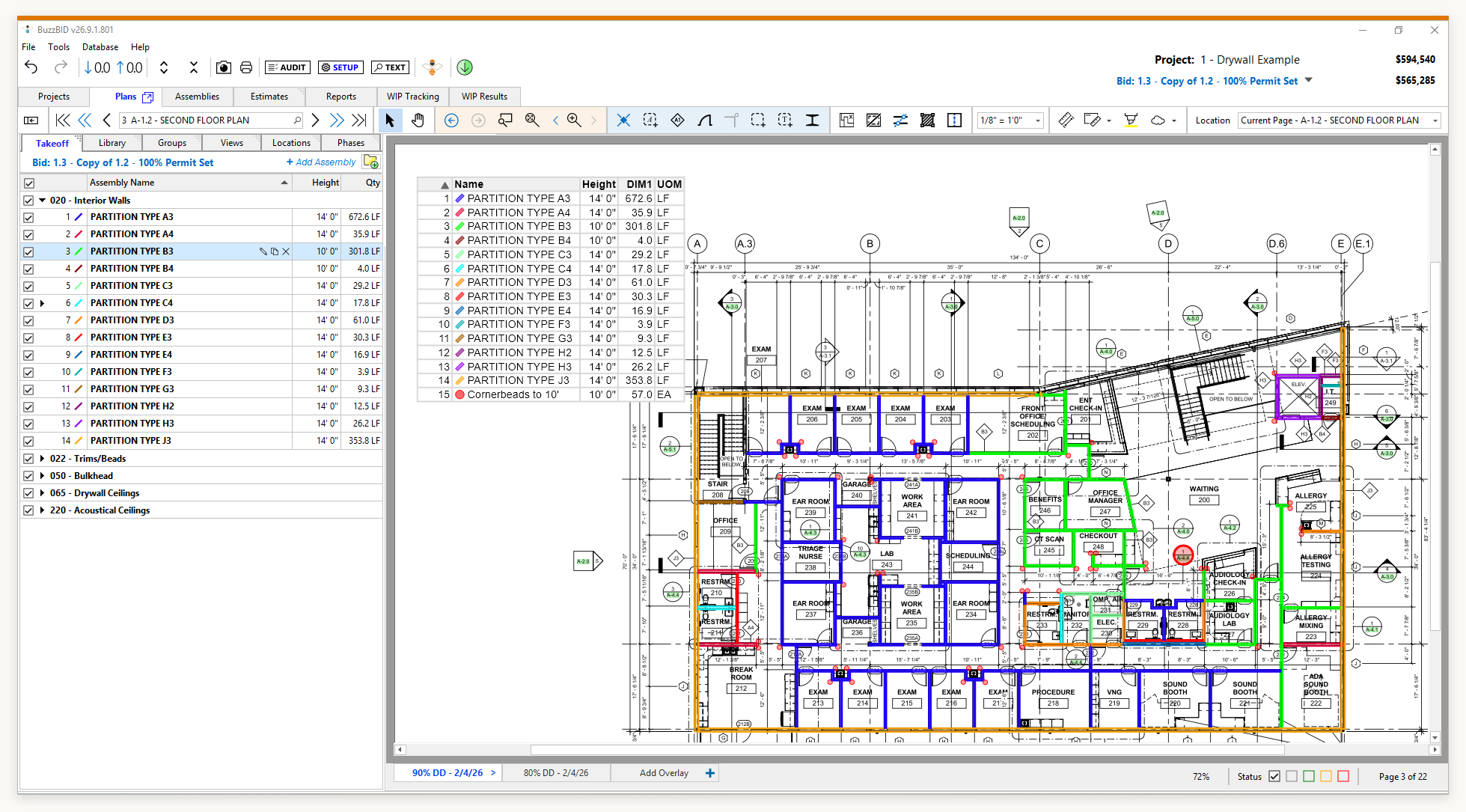




A BuzzBID buying guide for commercial specialty contractors
Quick answer: Choose construction takeoff software by testing a representative set of your own plans. Check how you measure and review quantities, handle a drawing revision, and carry the results into your estimate. Then confirm the edition, team access, training, and total cost.
A polished demonstration can show you what software does. Your own project shows you whether it fits the way your company bids.
What to Look for in Construction Takeoff Software
Takeoff software measures and organizes quantities from drawings. Estimating software applies material prices, labor assumptions, and other costs to that scope; preparing the bid also involves exclusions and commercial terms. For the fundamentals, see how construction takeoff software works.
When comparing digital takeoff software, use the same tasks and record what each product delivers.
On a small screen, scroll the checklist sideways to see all three columns.
| Area to compare | What to test | What to record |
|---|---|---|
| Measurement and review | Set the scale, measure your scope, and trace a quantity back to the drawing. | How you verify measurements and correct missed or unwanted items. |
| Scope organization | Separate quantities by floor, area, system, phase, or alternate. | Whether another estimator can understand the labels and exclusions. |
| Drawing revisions | Introduce a revised sheet with a known scope change. | How you identify affected quantities and confirm the estimate was updated. |
| Estimating handoff | Carry the quantities into the estimating process you intend to use. | What transfers, what needs adjustment, and what must be entered again. |
| Team access | Demonstrate the proposed setup with the users and licenses you need. | Access rules, project locking, and responsibility for backups. |
| Adoption and cost | Review setup, training, data migration, support, and subscription terms. | A written scope of what is included and what requires additional work or expense. |
Separate requirements you cannot work without from useful conveniences. A missing handoff into your estimating process may matter more than an impressive feature your team rarely uses.
Match the Test to Your Trade
Include the details that change quantities, materials, or labor on your jobs:
- Walls and ceilings: Include more than one wall type, different heights, openings, and a ceiling area. Check how framing, board layers, accessories, and labor assumptions are represented in the estimate.
- Plaster, stucco, and EIFS: Use a scope with distinct systems or finishes. Review the specified layers, openings, accessories, access equipment, and areas excluded from your work.
- Painting and coatings: Separate substrates and finishes. Test how preparation, coat counts, coverage assumptions, waste, and production rates affect the estimate.
- Fireproofing: Include the member or surface information and specified protection system relevant to the job. Confirm how material quantities and labor are developed, with qualified review of the applicable design and requirements.
Test Takeoff Software on Your Own Plans
Choose a small, representative scope that your team understands. For a drywall contractor, that might be part of one floor with two wall types, several openings, and a ceiling. Include a revision that moves a doorway or changes a wall type. That gives you a practical test of both the original takeoff and the work that follows a change.
1. Define the starting point
Give each vendor the same drawing revision, scope boundaries, and expected output. Verify the scale against a known dimension. Identify unclear details before measuring, so a difference in assumptions does not look like a difference in software performance.
2. Run the takeoff and review it
Measure the selected work, then inspect the results. For assisted or automated measurements, check what was included, missed, or selected incorrectly. Record the corrections and how easily you can make them.
3. Apply the drawing revision
Introduce the revised sheet. Follow the change through affected measurements, labels, and quantities. Check for obsolete or duplicated scope. If the product can carry changes into an estimate, ask to see the result and the review still required from your estimator.
4. Build or update the estimate
Use the same material prices and labor assumptions when comparing estimating tools. Inspect how the software handles the specified layers, openings, waste, equipment, and other costs relevant to the test. A lower total caused by an omitted item is not an improvement.
5. Have a second person review the handoff
Ask another estimator to follow a quantity back to its source and explain the assumptions behind its cost. Record questions they cannot answer from the output. If you are a sole estimator, revisit the work after a break and check it against your reference measurements.
Keep a short evaluation record: tasks completed, corrections needed, manual entries, unresolved questions, and training required. If you time the exercise, include setup, review, and corrections, and note your familiarity with each product.
Check the Handoff from Takeoff to Estimating
Construction takeoff and estimating software may be sold together or used as separate tools. Test the handoff you will actually use.
For an integrated product, ask to see measured scope connected to the assemblies and cost assumptions you would use. Change one input and inspect the resulting quantities and costs. Confirm which changes update automatically and which require another action.
For separate products, test the export and import using the editions you plan to buy. Compare item names, units, quantities, location labels, and totals before and after the transfer. A spreadsheet export does not establish a direct integration or automatic synchronization. Confirm the export formats available for retaining your project records, too.
Confirm Team Access and the Full Cost
Make sure the deployment fits your office. Ask whether the application runs in a browser, on a workstation, or through a hosted environment. Confirm hardware requirements, remote access, database administration, and backups for the proposed setup.
Do not assume “multi-user” means several estimators can edit the same project simultaneously. Ask the vendor to demonstrate access and locking behavior, along with how dedicated or shared licenses would work for your team.
Then request a quote for that exact arrangement. Consider the subscription or license charge, implementation, training, hosting or IT work, migration of existing data, and any required integrations. Include your staff’s time to test and learn the system. Our construction takeoff software cost guide explains the pricing questions in more detail.
Which BuzzBID Edition Fits Your Workflow?
If BuzzBID is on your shortlist, begin with the work you need the software to perform:
- BuzzBID Standard provides takeoff tools, including computer vision assistance with ClickONCE™. Consider it when measurement is the requirement and you will handle estimating separately.
- BuzzBID Advanced includes Standard’s takeoff capabilities and adds assembly estimating and work-in-place tracking. Consider it when you also need to develop costs from the measured scope.
- BuzzBID FireShield includes Advanced and adds tools designed for fireproofing estimating. Consider it when that specialized scope is part of your work.
Compare the current BuzzBID editions and pricing, then bring your requirements to a demonstration. BuzzBID is a Windows desktop/server application; discuss any hosted or remote-access arrangement you need. Confirm the setup, license assignment, and handoff before choosing an edition.
Choose the Workflow You Can Verify
Review your trial record with the people who will use the software. Resolve outstanding questions and decide whether any required workarounds are acceptable before buying.
If you already have a system that meets those requirements, switching may not be worthwhile yet. If a new product solves a meaningful problem, test a limited scope alongside your current process before relying on it for a live bid.
To evaluate BuzzBID, schedule a demonstration and tell us which trade, plan types, and estimating tasks you want to review.
Frequently Asked Questions
What features matter most in construction takeoff software?
Prioritize measurement review, clear quantity labels, drawing revisions, and the handoff into your estimate. Then check the functions specific to your trade, the access your team needs, and the total cost. Test those requirements on a representative plan rather than deciding from a feature count alone.
Can takeoff software export quantities to an estimating program?
Some products provide exports or integrations, but the supported formats and editions vary. Test the actual transfer into your intended estimating program. Verify units, quantities, item labels, and any location or assembly information you need. Ask what requires manual entry and how later revisions are handled.
How should I test whether takeoff quantities are accurate?
Use a clear drawing, verify the scale against a known dimension, and compare a selected scope with independently checked measurements. Review openings, duplicate items, omitted areas, and the active revision. Software can assist measurement, but the estimator must still verify the inputs, scope, and results.
How should I test takeoff software with revised drawings?
Start with a reviewed takeoff, then introduce a drawing with a known change. Check how the product identifies or replaces affected measurements, preserves unaffected work, and handles obsolete quantities. Follow the change into the estimate and record any steps your team must complete manually.